# Auto-generated docs
`bejamas/ui` supports auto-generated documentation based on structured comments inside each component.
When you run the CLI, it scans your components, extracts those comments, and generates MDX pages. Your Starlight docs site then picks up these MDX files like any other content.
This keeps your documentation:
- always in sync
- version-friendly
- easy to maintain
- fully Astro-native
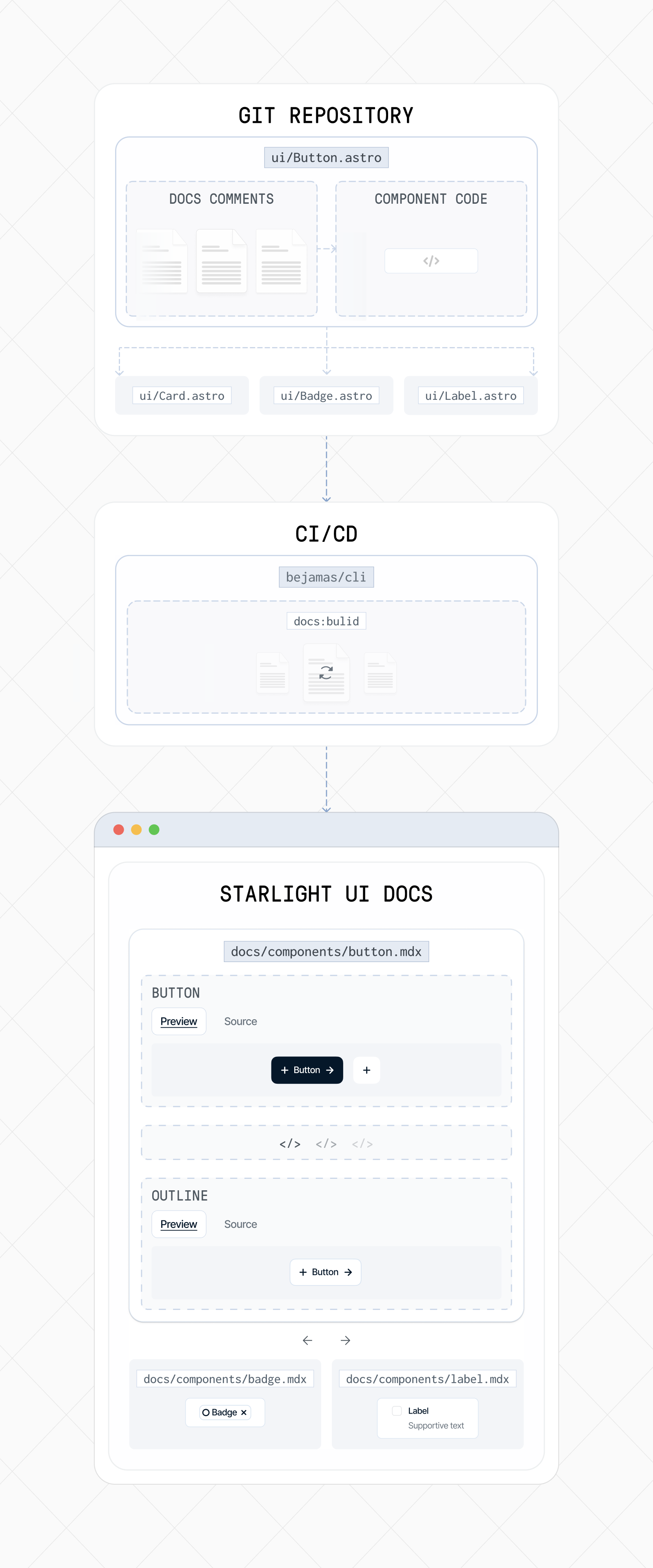
## Build the docs
You can generate all component docs using the CLI:
```bash
bunx bejamas@latest docs:build
```
```bash
npx bejamas@latest docs:build
```
```bash
pnpm dlx bejamas@latest docs:build
```
```bash
yarn dlx bejamas@latest docs:build
```
### Optional flags
- `-c, --cwd` → specify the path to your UI components
- `-o, --out` → specify where generated MDX files should be written
```bash
bunx bejamas@latest docs:build -c ./packages/ui -o ./docs/components
```
```bash
npx bejamas@latest docs:build -c ./packages/ui -o ./docs/components
```
```bash
pnpm dlx bejamas@latest docs:build -c ./packages/ui -o ./docs/components
```
```bash
yarn dlx bejamas@latest docs:build -c ./packages/ui -o ./docs/components
```
### Configuration via `components.json`
By default, the CLI reads configuration from a `components.json` file at the root of your project.
The `components.json` file configures how the docs generator behaves (paths, aliases, styling). Most projects won’t need to change it.
```json title="components.json"
{
"$schema": "https://ui.bejamas.com/schema.json",
"style": "bejamas-juno",
"tailwind": {
"config": "",
"css": "src/styles/global.css",
"baseColor": "neutral",
"cssVariables": true,
"prefix": ""
},
"iconLibrary": "lucide",
"aliases": {
"components": "@/components",
"utils": "@bejamas/ui/lib/utils",
"ui": "@bejamas/ui/components",
"lib": "@bejamas/ui/lib",
"hooks": "@bejamas/ui/hooks",
"docs": "@/content/docs/components"
},
"registries": {}
}
```
## Writing documentation inside components
Documentation is stored directly inside the component file using structured comment tags.
These tags form the source of your generated docs pages.
### Supported tags
These tags control what content appears in the generated MDX page.
- `@component` — canonical component name
- `@title` — human-readable title for the docs page
- `@description` — short description shown at the top
- `@preview` — main interactive preview example shown at the top
- `@usage` — usage example (rendered as a code block)
- `@examples` — additional examples and sections
### Full example
Below is a complete example from the `Button` component in the `bejamas/ui` package.
````astro
---
/**
* @component Button
* @title Button
* @description Displays a button or a component that looks like a button.
*
* @preview
*
*
*
*
*
*
* @usage
*
* ```astro
* ---
* * ---
*
*
* ```
*
* ## Link
*
* You can use the `as` prop to render the component as an anchor.
*
* ```astro
* ---
* * ---
*
*
* ```
*
* @examples
*
* ### Variants
*
*
*
*
*
*
*
*
*
* ### Sizes
*
*
*
*
*
*
*
*
*
*
*
*
*
*
*
*
* ### With badge
*
*
*
* ### Destructive
*
*
*
* ### Outline
*
*
*
* ### Secondary
*
*
*
* ### Ghost
*
*
*
* ### Link
*
*
*
* ### Default
*
*
*
*/
---
````
You can see the final generated documentation page [here](/components/button).
## Summary
Documentation is written inside component files.
The CLI extracts comments and builds MDX docs automatically.
Output integrates perfectly with Astro Starlight.
No Storybook, no React, no overhead — just clean, self-contained docs.